Showing posts with label Cybersmart. Show all posts
Showing posts with label Cybersmart. Show all posts
Monday, 26 October 2020

Friday, 17 April 2020
Collage | Smart Learner Challenge

This is another activity and it was collage and I used the explore tool and shapes to make this kiwi. This was fun to do and using shapes to make this kiwi and I watched a video example of what to do. Hope you enjoy my drawing for activity 8 on the smart learner blog challenge.
Tuesday, 14 April 2020
Free Hand Drawing | Smart Learner Challenge

The activity I did today was free hand drawing on your device. I free hand drawed this Panda, I thought it was going to be hard but at the end it was easy after all. I enjoyed this activity cause I like drawing but sometimes it gets too hard at some time. But this was the third activity in the smart learner blog challenge and this was fun.
Monday, 6 April 2020
Photo | Smart Learner Challenge
Today I did another task and it was photo where I use the explore tool to find a picture to use my own. I decided to use explore tool to look for any different photos and I got this one. So the website was Flickr where I got this photo from. And here is the link to my photo Flickr.
Friday, 16 November 2018
Commenting

LI: To comment on someone's blog.
Today I comment on Angelica's blog post that she did for Writing. First I had to read the blurb and then I had to comment on her work. So after I read her blurb I comment on her work and said what I was going to type in and then I wrote Keep up the good work Angelica. So that's what I did but first I read it then I commented on her blog but first I did a greeting and then I started typing what I was gonna type. I learnt how to comment on other students blog post and proof read it to myself.
Friday, 26 October 2018
Commenting

LI: To comment on someone's blog.
Today I comment on Charlize's blog post that she did for Writing. First I had to read the blurb and then I had to comment on her work. So after I read her blurb I comment on her work and said what I was going to type in and then I wrote Keep up the good work Charlize. So that's what I did but first I read it then I commented on her blog but first I did a greeting and then I started typing what I was gonna type. I learnt how to comment to others blog.
Wednesday, 24 October 2018
Smart Media
LI:To identify gimmikes used to arttract and peruade people to purchase products.
This week for Cyber-Smart we had to finsh the 3 slides before we finished this Smart Media google slide. The 3 slides we had to finsih was who created the media and other stuff on slide 11 with orange text and the 12 slide was when consuming we need to consider and other questions that LS1 did but we had to write it down in orange text.
Thursday, 18 October 2018
Co-Co's Crunch
This week for Cybersmart we had to play this game about Co-co's ceral website. On that website it was wanting us to make a poster and make it look nice and encourage everyone to buy Co-Co crunch, and say how crunchy and tasty it is. On my website I have a sticker with design your own Co-Co Crunch cereal box, the character lewis the dragon, the motto that tells you is tasty and chunchy and that you can come back for more and the cereal box and a contest you could enter to get one. This is the game we played for cybersmart and it was our first lesson for cybersmart for term 4.
Friday, 28 September 2018
Commenting

LI: To comment on someone's blog.
Today I comment on Liletina's blog post that she did for Inquiry. First I had to read the blurb and then I had to comment on her work. So after I read her blurb I comment on her work and said what I was going to type in and then I wrote Keep up the good work Florence. So that's what I did but first I read it then I commented on her blog but first I did a greeting and then I started typing what I was gonna type. I learnt how to comment on other students blog and write things that's not in there blog post.
Thursday, 28 June 2018
Commenting
Today for commenting I commented on Angelica's blog post she blogged. First I had to read Angelica's blog post so that I can comment something on her blog. I commented on Angelica's blog post for her writing must do.

Netuquette rules
LI.To interact online in kind, positive, and helpful way.
This week we did cyber smart. For cyber smart we had to do Netuquette rules about being on online. We had to watch a video and then fill out a google slide with our ideas. Then we had to work by ourself to this DLO about Netuquette rules and we had to do it on a google draw and had to do this on our own so that we learnt something about Netuquette rules an about smart relationships.
Friday, 25 May 2018
Commenting

LI. To comment on someone's blog post.
This week for Commenting I commented on Florence's blog on her Explanation planner. First I had to read Florence's blog before I do comment to understand what she wrote down. After I read Florence's blog post I did a comment on it about what she did and some fix ups she had to do.
Friday, 13 April 2018
Doraemon
LI: To prioritise tasks and collaborate to complete a job on time.
Yesterday for Cybersmart we had pick which one we wanted so my group choose Doraemon instead of doing Apanman. For this Cybersmart DLO I was working with Kaitlyn, Fau, Charlize and myself. We did eight sldies with different information written about Doraemon, but also images and gif images about him doing the same thing. In these google slides it shows you who invented him and who he is what he likes and what his Favourite things to do and his Favourite food. I learnt how to get shared a google slide and write down information about Doraemon and Kaitlyn insert's the images and the videos onto the google slide and Charlize and Fau writes infromation.
Thursday, 5 April 2018
Cybersmart-Care Values

LI. To compare smart values with the Panmure bridge school Care values.
Today for Cybersmart we had to get in a group, make a google doc and share it with the whole group to work on it for C-A-R-E- values. Then after we planed our care values we had to make a DLO as a group. Our DLO was about Respect and we did 4 text boxes about why we use respect in school and why we use respect in class, Also we all did a text box and wrote about respect.
Wednesday, 28 March 2018
Commenting
LI. Comment on someones blog.Today for Commenting I commented on Victoria's blog post about there Motto. First I went on Victoria's blog and looked for a blog post to comment on. So then I found a blog post of there Team Motto and then I did a comment on Victoria's blog post. Then I blogged about commenting on Victoria's blog post.


Cybersmart: Clean Google Drive
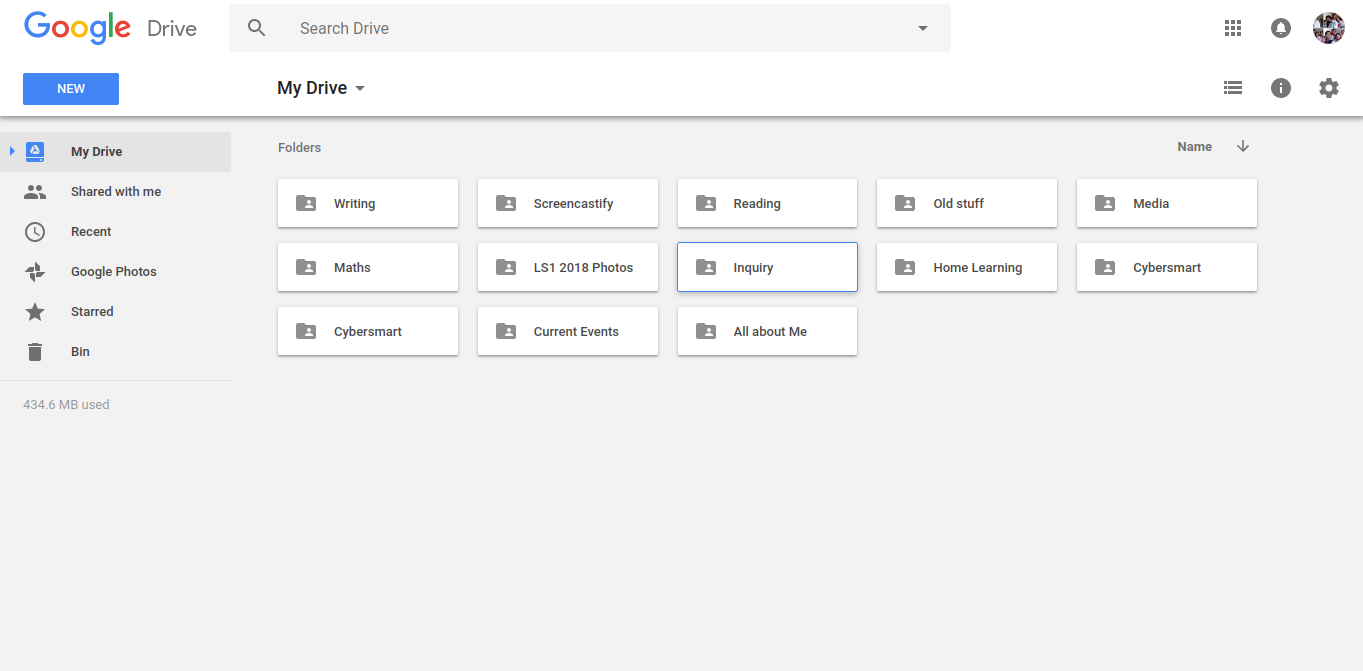
LI.To Organised our files correctly.
This week for Cybersmart we had to clean out our google drive, but put every DLO in the right file. We had to do this by getting a buddy like Mr Wong said the year 5 from last year has to go with the year 5 thats in LS1 now, and the years 6's have to buddy up with the year four's. How to clean up your drive is that if you scroll down on your google drive then that means that you don't file any of the DLOs you do each time. So first you have to get the first DLO and put it in the correct folder so that you now where it is, Also if you delete the folder than that means you have to make a new folder or you have to check in the bin if that folder is in it, Like Reading, Writing, Maths, Inquiry that the important stuff you have to leave on your google drive first.
Friday, 23 March 2018
Commenting

LI. Comment on someones blog.Today for Commenting I commented on Charlize's blog post about there Motto. First I went on Charlize's blog and looked for a blog post to comment on. So then I found a blog post of there Team Motto and then I did a comment on Charlize's blog post. Then I blogged about commenting on Charlize's blog post.
Wednesday, 21 March 2018
Device skills
LI.To learn and use core digital device skills.
Today for Cybersmart we had to do Device skils. We had to get into a pair of 2 like someone. I learnt how to make a copy of this google slide about Device skills. My buddy for this Device skills google slide was Liletina,I did four slides and she did three slides of this work. For this google slide we did someone a bit like keyboard short cuts but a google slide way. This did not take forever to finish, but this only took a few hours then I blogged it with my buddy Liletina.
Wednesday, 20 December 2017
Commenting

LI.To comment on a students blog post.
Today for commenting I commented on Stacey's blog post and she is from tamaki primary. First I had to read her poster and read her blurb.Then later on I did a smart comment on the blog post she did.I smart commented on the one My hobby hero.
Tuesday, 21 November 2017
Commenting
Miiana21 November 2017 at 14:29
Greetings Liane
I've done the same blogpost as you have done for fire station visit.But your blog post you did was very intreating to read and learn from.But that was a good blog post for fire station visit.
Keep up the good work!
I've done the same blogpost as you have done for fire station visit.But your blog post you did was very intreating to read and learn from.But that was a good blog post for fire station visit.
Keep up the good work!
LI.To comment on someones blog post for cybersmart.Today I blog commented on Lianes blog post for fire station visit.So first I had to read Lianes blurb about her learning she did.After I read Lianes blog post about fire station visit I had to do a smart comment on this blog post she did on fire station visit.
Subscribe to:
Posts (Atom)